




You want one quick number from your system. Suddenly you are clicking through filters, switching between views and opening records you did not need to open. By the time you find what you were looking for, five minutes have passed and you have lost the thread of what you were doing.
OpusAI, the native AI in ERP software, was built to fix exactly that. Ask a question in plain language and get a clear answer from your data in seconds. No navigation, no report builder, no manual searching.
And it goes further than answering questions. OpusAI takes action too. Tell it what needs to happen and it handles the work, right inside OpusFlow, with full context of your projects, your team and your data. Before anything changes, it shows you a summary and waits for your go-ahead.
What is AI in ERP Software like OpusAI
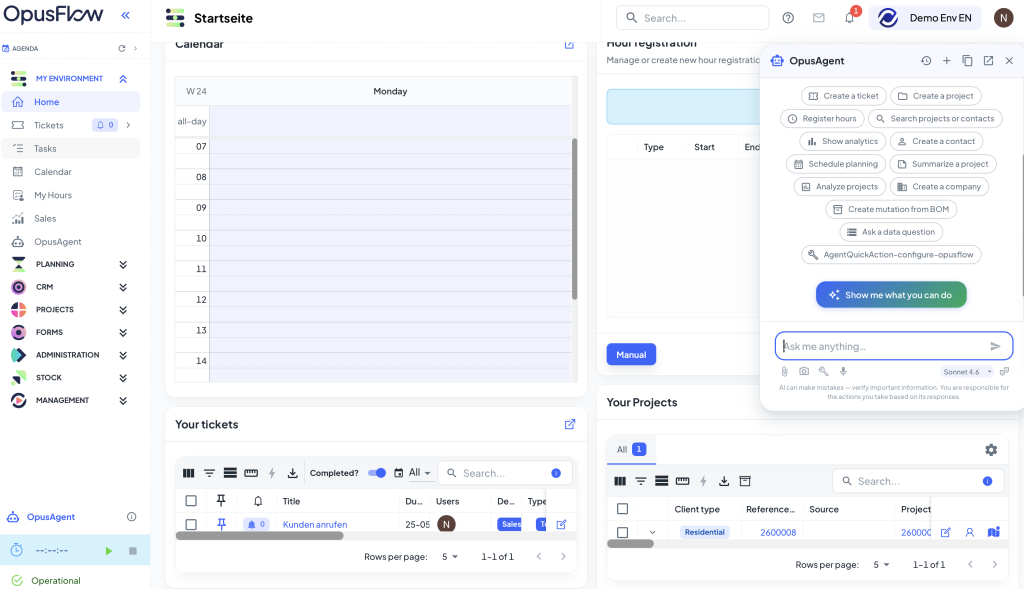
OpusAI is a conversational AI built natively into OpusFlow ERP Software. It is not a bolt-on tool that connects to your software from the outside. It lives inside the platform and has full access to everything in your database: every project, every quote, every contact, every planning entry, every invoice.
That context is what makes OpusAI, the AI in ERP, different from a generic AI assistant. When you ask a question or give an instruction, it already knows your business. You do not have to export data, switch tools or explain the background. You just type, and OpusAI gets to work.
It works in English, Dutch, German, French and more. And it only ever works with what is actually in your database. If a question is unclear, it asks for clarification rather than guessing.
Want to learn how AI is reshaping ERP systems and making teams more efficient? Read also our blog post: AI in ERP Systems.
OpusAI instantly answers using your own data
The fastest way to get information out of your system is to ask for it. OpusAI turns any question about your business data into an immediate, clear answer, without touching a single filter or report.
Project and pipeline queries
Ask how many projects are in a certain status, which ones have not been updated recently, or where a specific job stands in the pipeline. OpusAI returns the answer immediately, based on your live data.
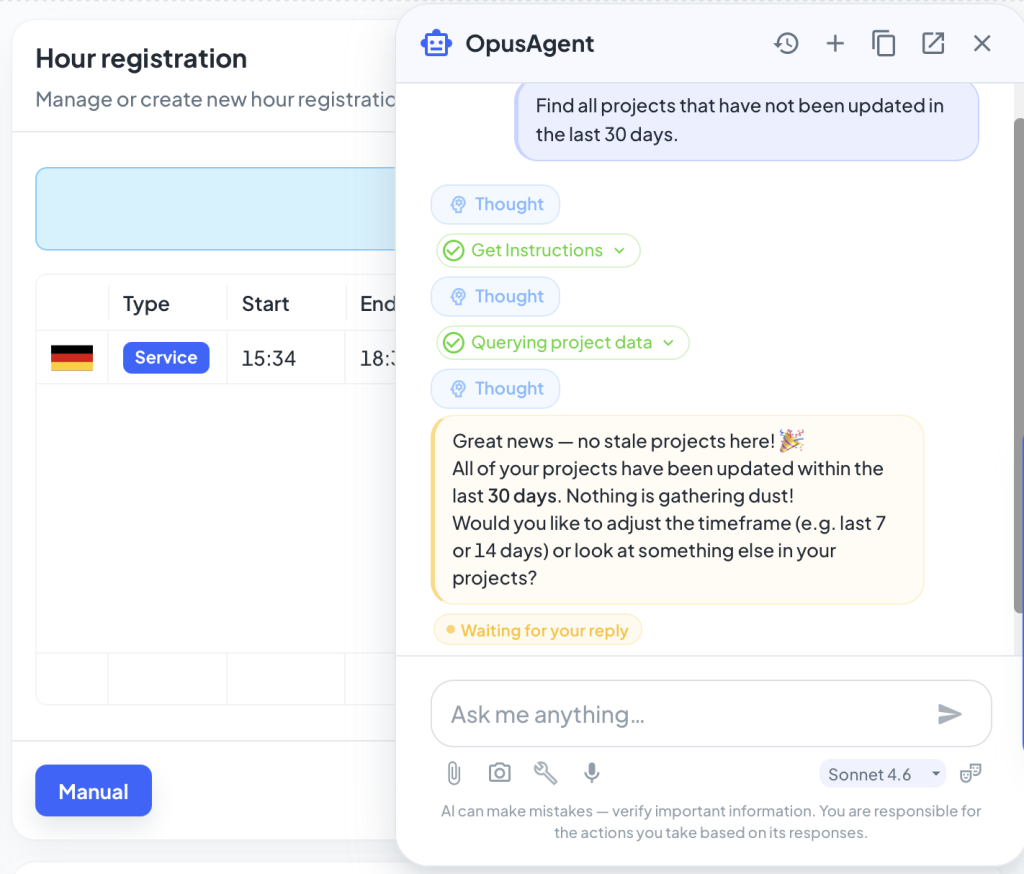
Ask OpusAI for example: “Find all projects that have not been updated in the last 30 days.”
Financial metrics on demand
Whether you need an average accepted quote value, revenue broken down by project source or a comparison between two periods, OpusAI pulls the numbers directly from your data and presents them in a readable format.
Ask OpusAI for example: “What is the average total of accepted quotes”
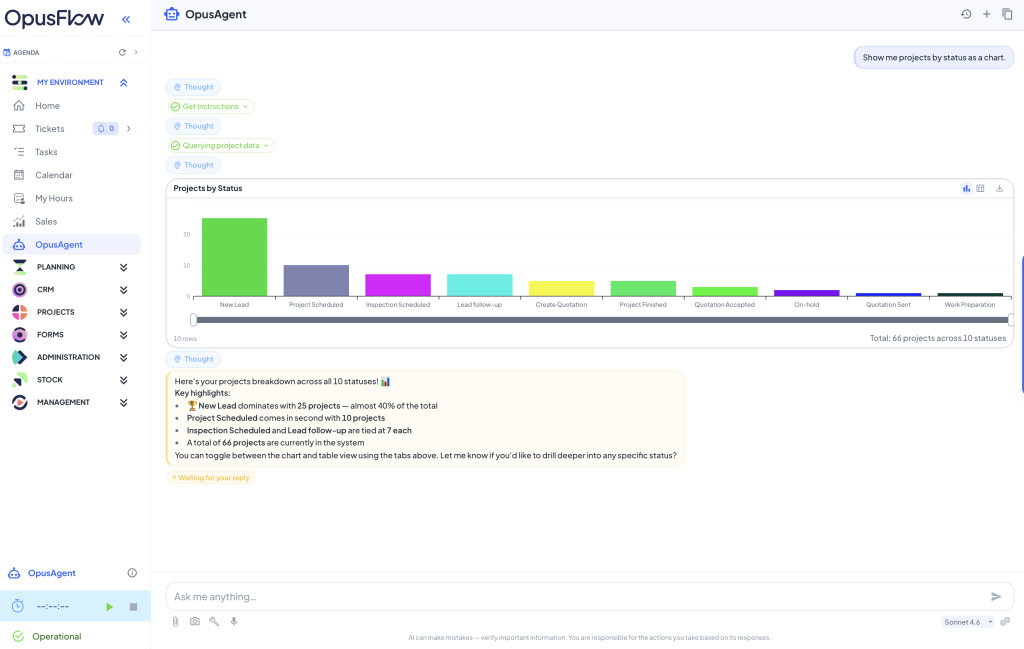
Charts and visual insights
Ask OpusAI for example: “Show me projects by status as a chart.”
Form summaries
Long inspection reports and field forms take time to read through. OpusAI summarises them instantly, pulling the key findings into a structured overview so you get the important information in seconds rather than minutes.
Ask OpusAI for example: “Give me an overview of this filled form, formatted as a table.”
Data hygiene checks
Missing data creates problems downstream. OpusAI surfaces the gaps before they become issues: products without datasheets, projects without linked contacts, quotes with missing fields.
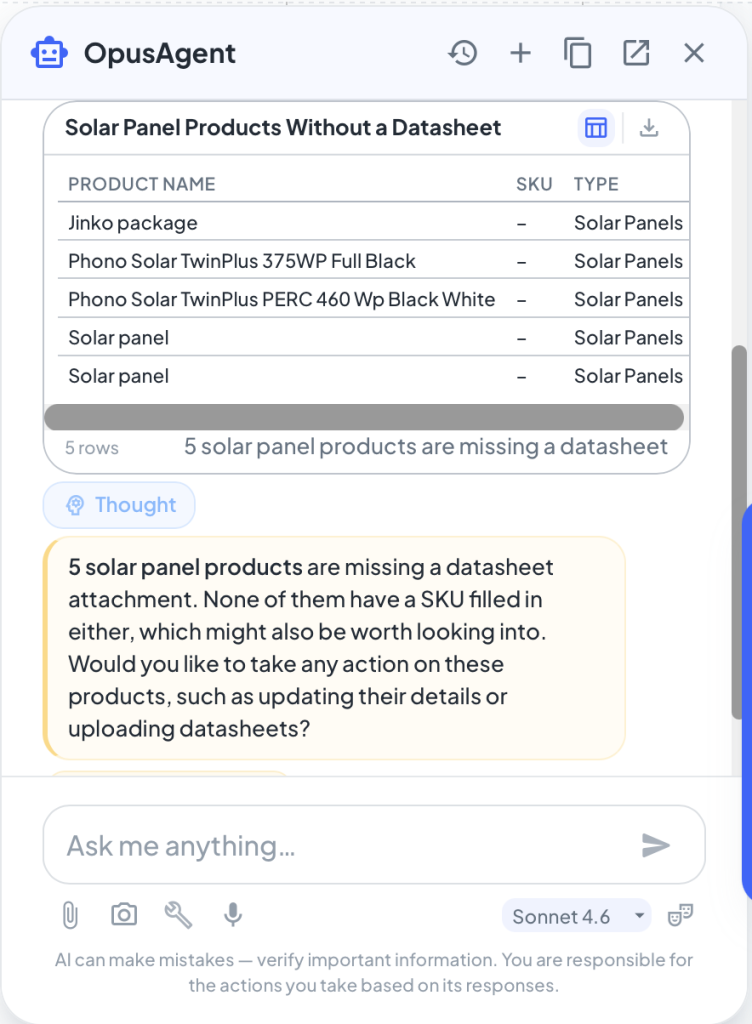
Ask OpusAI for example: “Which solar panel products do not have a datasheet attached?”
What OpusAI will not answer
When using AI inside business systems, clear boundaries are essential. The OpusAI is designed to stay within an operational business context. This ensures the assistant remains focused on business data and avoids answering questions that are not relevant to projects, quotes, or stock.
You cannot ask OpusAI for example: “What are the worldcup results of UK vs Germany.”
AI in ERP: OpusAI from answers to action
Knowing the answer is useful. Getting something done is better. OpusAI does not stop at insight. It takes action across OpusFlow on your behalf, so you spend less time navigating and more time on the work that actually matters.
You give the instruction in plain language. OpusAI shows you a summary of what it is about to do and waits for your approval before anything changes. Once you confirm, it handles the navigation, the clicks and the data entry. It works across modules and can chain multiple steps together in a single instruction.
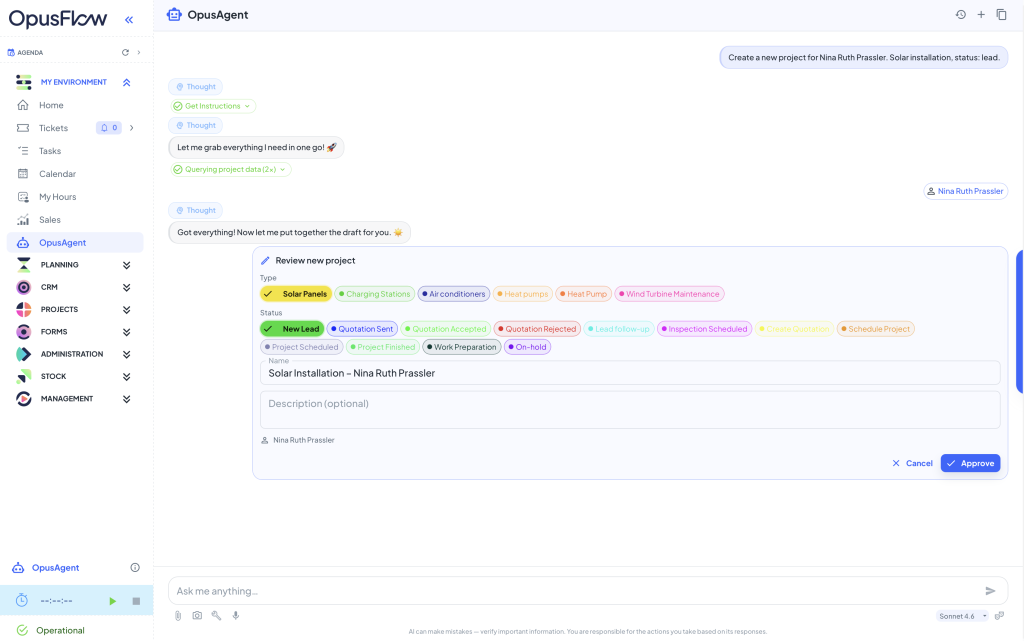
Create projects and contacts
When a new lead comes in, you no longer need to navigate to the right module and fill in the fields one by one. Tell OpusAI what you need and the record is created with the right details, linked to the right contact.
Ask OpusAI for example: “Create a new project for any client. Solar installation, status: lead.”
Manage planning and scheduling
Scheduling changes happen constantly in installation businesses. OpusAI lets you manage planning entries without leaving what you were doing. Add appointments, move entries, assign team members and update the schedule, all through a simple instruction.
Ask OpusAI for example: “Schedule a site visit Friday 09:00 to 12:00 for the project xyz and put employee 1 and employee 2 on it.”

Create and route service tickets
When a customer reports an issue, you do not need to navigate to the ticket module, find the right project and fill in the form. Tell OpusAI what happened and it creates and routes the ticket for you.
Ask OpusAI for example: “Create a ticket for the roof inspection at xyz, assign it to employee 1, priority high.”

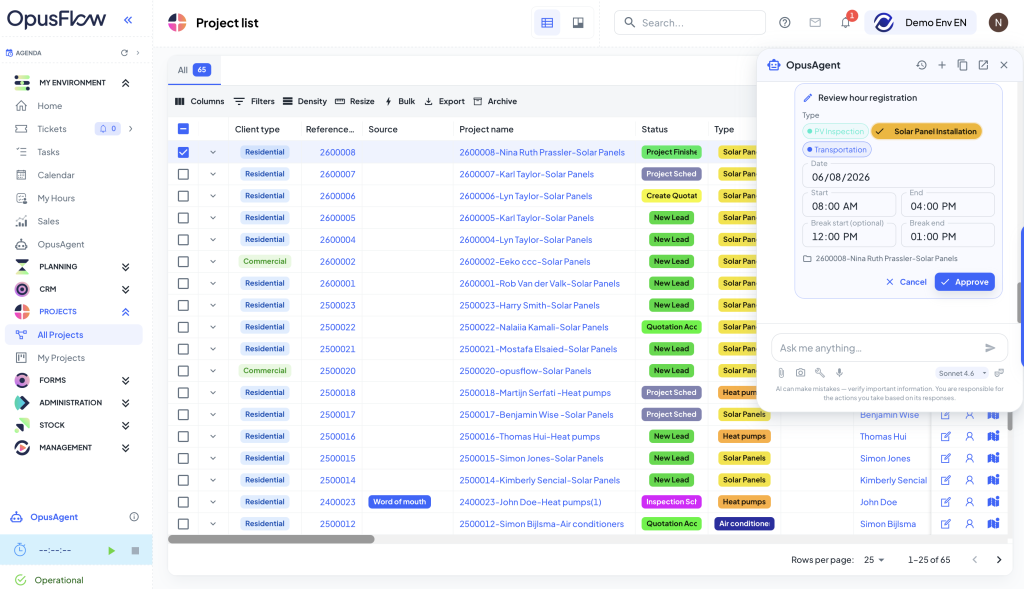
Log hours
At the end of a job, logging hours should take seconds. Tell OpusAI what to log and it handles the entry, linked to the right project and the right category, including breaks.
Ask OpusAI for example: “Register 7 hours today on the xyz project with a 1-hour lunch break.”
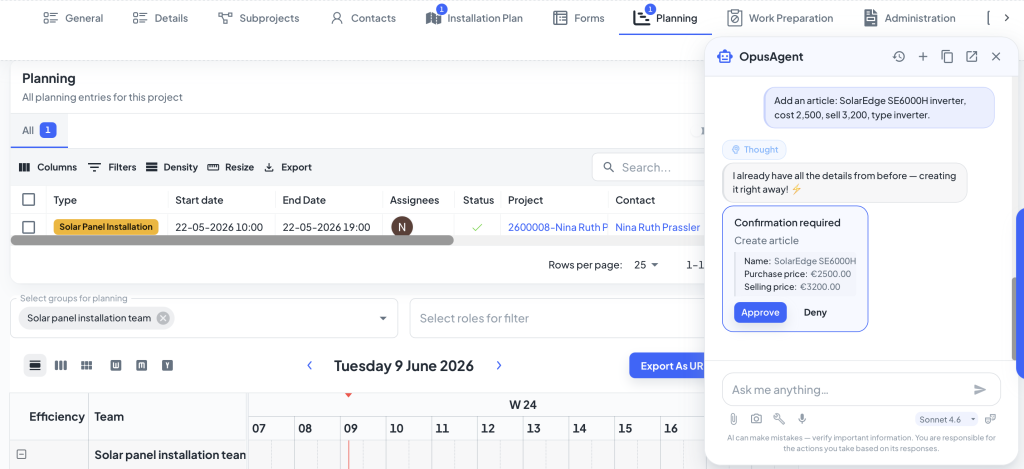
Manage your product catalogue
Adding new articles, updating prices or importing a batch of products no longer means navigating to the right screen and filling in each field. Tell OpusAI what you need and it handles the entry, one item or fifty at a time.
Ask OpusAI for example: “Add an article: SolarEdge SE6000H inverter, cost 2,500, sell 3,200, type inverter.”
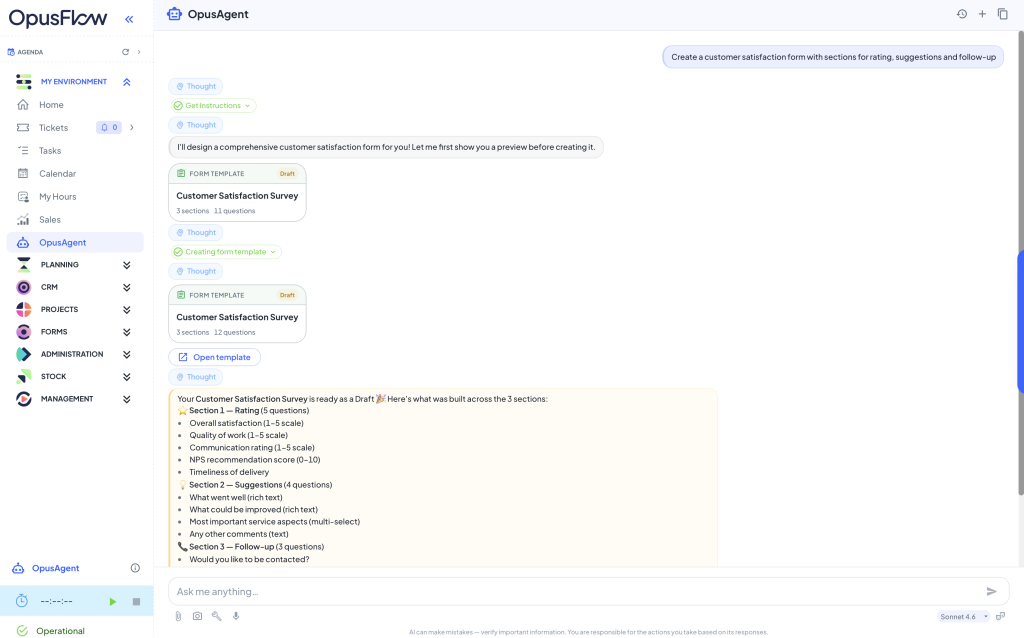
Build forms
Ask OpusAI for example: “Create a customer satisfaction form with sections for rating, suggestions and follow-up.”
Multi-step tasks in one instruction
A single instruction to OpusAI can trigger multiple steps across modules. Create a record, assign it, schedule a visit and log the hours, without you managing each step manually. That is what it means to have AI built into your ERP rather than sitting on top of it.
Ask OpusAI for example: “Create a ticket for the roof leak at customer xyz, schedule a visit Friday and put employee 1 on it.”

OpusAI: An AI in ERP that is built for trust.
Letting an AI take action in your business system is only useful if you can trust it completely. OpusAI is designed with that in mind.
- Nothing happens without your approval. Before it creates, changes or deletes anything, OpusAI shows a summary of exactly what it is about to do. You approve or cancel. It never acts silently.
- It respects your permissions. OpusAI can only see and touch data the logged-in user is already allowed to access. It inherits the exact access rules of the rest of OpusFlow.
- Every action is logged. Admins can see who asked OpusAI to do what, when and what the result was. Full accountability, always.
- Deletes are deliberately limited. OpusAI will not delete projects, tickets or contacts.
- Your data stays yours. Every company's data is fully isolated. OpusAI only ever works within your environment.
The short version: it proposes, you approve. If you say no, it stops.
Why OpusAI makes a difference for installation businesses
Installation businesses run on tight margins and fast-moving schedules. The time your team spends searching for information, manually creating records and switching between modules is time not spent on site, on quotes or on customers.
There is also a practical reality for business owners: the hardest part of any ERP system is getting the whole team to use it properly and consistently. OpusAI lowers that barrier significantly. If someone can send a text message, they can use OpusFlow. That means cleaner data, higher adoption and more value out of the system your business is already running on.
Because OpusAI is built into OpusFlow rather than connected from the outside, it has the context to act, not just inform. It knows your projects, your team and your operations. You do not have to explain the background every time you need something done.
One system. One source of truth.
Most installation software does one thing well. You might use one tool for quoting, another for planning, a third for tickets, and something else for contract management or field forms. Each of those tools holds a piece of your business data, and none of them talk to each other reliably.
That fragmentation is exactly what makes AI features in point solutions so limited. An AI that only has access to your quotes cannot factor in your planning capacity. An AI that lives in your ticketing tool has no idea what was agreed in the contract. Partial data leads to partial answers, and partial answers lead to bad decisions.
OpusFlow is built differently. CRM, project management, planning, quoting, invoicing, contract management, ticketing, time tracking, field forms and more all live in one platform. That means OpusAI has one complete picture of your business, not a fragment of it. When it answers a question or takes an action, it is working from everything, not just the slice of data that happens to live in one module.
What is coming next for OpusAI
Curious to explore other big feature releases in OpusFlow? Take a look at our Battery Calculator.
Conclusion
OpusAI, the AI in ERP, is not just a search tool or report generator. It answers your questions, takes action on your instructions and keeps a human in the loop at every step. All inside OpusFlow, all connected to the data and operations you already run every day.
Ask questions. Get answers. Give instructions. Get results.
Want to see what it can do with your data? Book a demo and we will walk you through it live.
One Platform to Run Your Entire Installation Business
Manage leads, projects, stock, and invoicing — everything in one smart system built for sustainable installers.


