Running an installation business gets harder the moment your jobs start stacking up. Schedules collide, crews wait on missing details and the office spends half the day chasing updates. It’s normal as you grow. What’s missing isn’t effort or discipline. It’s one system that keeps every project moving in the same direction.
This guide breaks down what project management software actually does for installers, how to choose the right tool for your team and when you might need something bigger. By the end, you’ll know exactly what to look for and how to bring order back to your workload.
A quick summary of this article:
- Installation teams struggle with coordination because information lives in too many places.
- Project management software keeps jobs on track by aligning office and field teams.
- ERP becomes the better fit when you need one system from quote to stock to invoice.
- OpusFlow helps you run installs smoothly today while building the connected workflow you’ll need as you scale.
Why installation businesses struggle with project coordination
If your projects feel harder to keep up with lately, you’re not imagining it. As your team grows and job volume goes up, the old way of working starts to crack. It’s normal and it’s not because you’re “unorganized.” It’s because you don’t have a single place to manage the moving parts.
Most installers run into the same issues:
- Too many tools: Jobs live in emails, WhatsApp chats, spreadsheets, and someone’s memory. Everything lives in separate channels and it gets harder to keep up with the scattered information.
- Office ↔ field blind spots: Your planner updates a schedule… but the crew never sees it. The crew sends photos… but the office loses them in a thread.
- Colliding calendars: Two installs booked at once. A permit delayed. A crew stuck waiting for materials. Small slips turn into full-blown bottlenecks.
- Paper-heavy processes: Quotes, approvals, checklists: they’re all done manually. Easy to miss, easy to duplicate and hard to trace.
Sound familiar?
This is exactly where strong project management software makes a difference. It gives you one place to plan work, track progress and keep everyone aligned so nothing slips through the cracks.
What is a project management software (for installers)?
Project management software gives you one place to plan jobs, track progress and keep your team aligned. Think of it as the control center for every install. Instead of juggling spreadsheets, chats and loose documents, you manage the full workflow from a single screen.
For installers, it matters even more because your work happens in two places at once: the office and the field. A good tool connects both sides so planners, coordinators and crews see the same information at the same time.
At its core, project management software helps you:
- Create and assign tasks
- Plan your calendar and crew schedules
- Share files, photos and job details
- Track progress from quote to completion
- Reduce mistakes that come from scattered information
One Platform to Run Your Entire Installation Business
Manage leads, projects, stock, and invoicing — everything in one smart system built for sustainable installers.

5 Benefits of project management software for installers
When your team is running multiple installs each week, small inefficiencies stack up fast. Project management software helps you run smoother by giving everyone the same clarity, the same information and the same plan.
Here’s what that looks like in practice:
1. Real-time visibility on every job
You shouldn’t have to call three people to know if a job is done. With a clear project view, you see progress the moment it happens. Think of it like checking the weather before sending a crew out. No surprises, no guesswork.
2. Clear communication between office and field
3. Faster responses to customers
A customer calls asking when their heat pump will be installed. Instead of digging through emails, you check the project timeline and give them an answer on the spot. Quick responses build trust and reduce the daily back-and-forth that slows everyone down.
4. Fewer mistakes and double entry
A wrong connector, a missing panel, a mismatched inverter… Small data errors cost real time on site. But when everything flows from quote to project to install, your team stops retyping info and the details stop drifting. What the salesperson promised is what gets built.
5. More predictable revenue through better planning
When you see upcoming installs, crew capacity and material needs in one place, it’s easier to plan the week with confidence. No more last-minute scrambles or wasted days. More predictable scheduling means smoother operations and steadier cash flow.
Core features to look for in project management software (and why they matter to installers)
Not every project tool works for an installation business. You need features that fit how your teams actually work: part in the office, part on roofs, driveways and mechanical rooms. Use this list as a quick filter:
Task management with visual timelines
Gantt or Kanban views help you see what’s on track and what’s falling behind. It keeps both planners and crews aligned on the sequence of work.
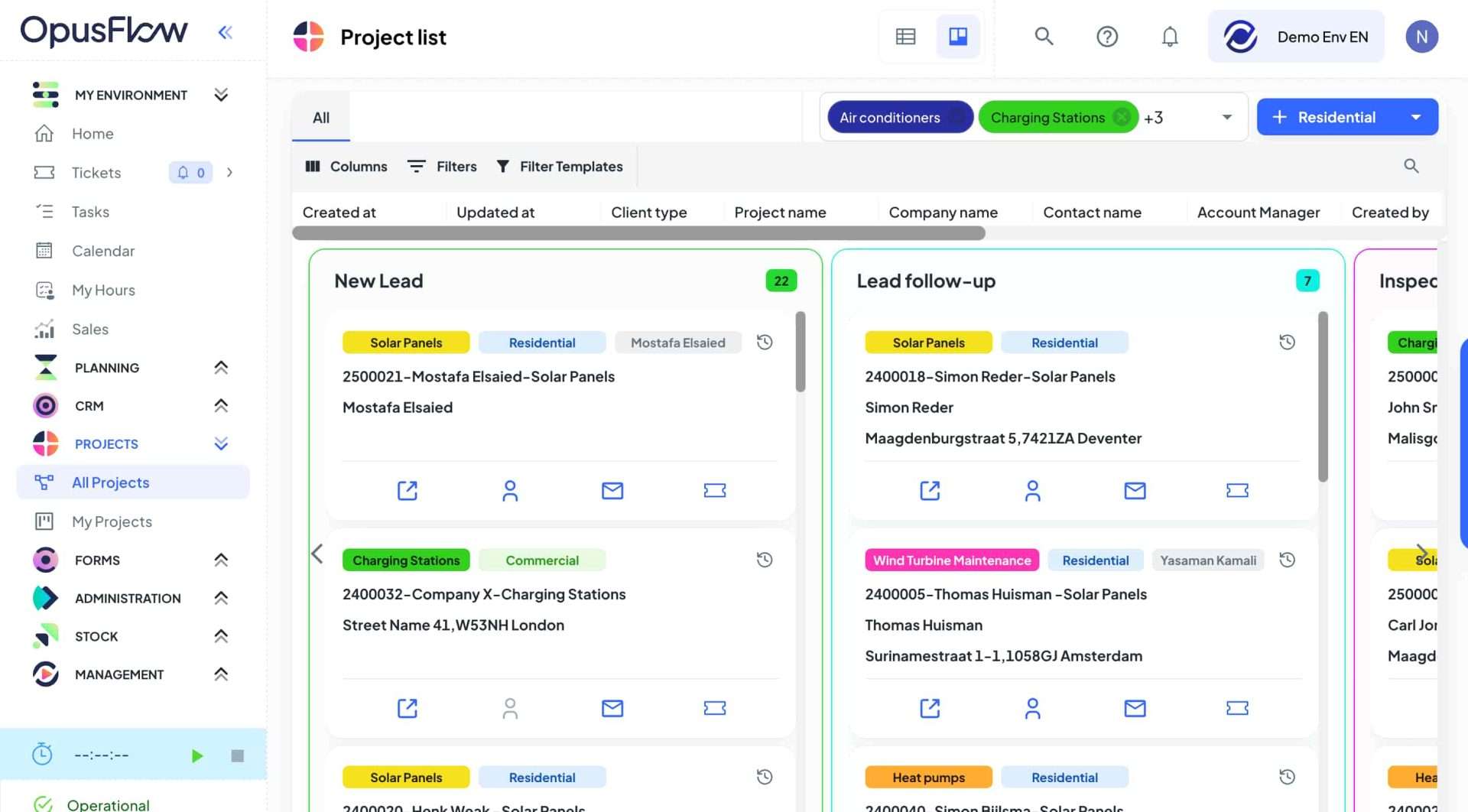
For example, OpusFlow’s project view gives you a clear Kanban board where every task moves from “to do” to “in progress” to “done.” You create tasks or tickets in one click, assign them to a team member and track progress without chasing updates.
Calendar and scheduling visibility
You should see all installs, surveys and service visits in one place. This prevents double bookings and helps you match the right crew to the right job.
In OpusFlow’s Planning module you can drag a project straight onto a crew’s schedule, see their availability and filter by project type or location. If you move a job, the team sees it immediately.
Mobile access for field teams
Crews need job details, photos and checklists on their phones. If they can’t use it on-site, they won’t use it at all.
File and photo uploads from installation sites
Plans, permits, measurements and final photos should live in one system. No digging through chats for important files.
Integration with your CRM, quoting and invoicing tools
The best setup connects sales and operations so info flows automatically from quote to plan to invoice. Less admin, fewer mistakes.
Permissions and role-based access
Admins, planners and installers don’t need the same view. Good software lets you control who sees what to reduce clutter and avoid confusion.
With OpusFlow, for instance, you can control user access so each role sees exactly what they need and nothing more. This keeps the system clean and avoids confusion for field teams who only want the essentials.
How to choose the right project management software for your team
Choosing project management software can feel like choosing a new work van. On paper, many look the same. In reality, only a few can handle the weight you put on them every day. Use these lenses to figure out what will actually work for your crew, not just look nice in a demo.
Ease of use for both office and field teams
Start with something simple. For example, try handing your busiest installer a phone with the tool open and ask them to quickly find a job detail. If they squint, scroll or tap around with a confused face, that’s a sign to walk away.
Under the hood, simplicity comes from things like:
- Actions that aren’t hidden in nests of menus
- Task flows that match how installers move through a job

Scheduling and task visibility
Your planner should be able to drag a job to next Tuesday and see instantly how it affects the rest of the week. Think of it like Google Maps for your workload. You need to see bottlenecks before you hit them.
Technically, this means the software should:
- Support real-time conflict detection
- Show crew availability and certifications
- Connect project milestones to planning calendars
- Update dependencies automatically when timelines shift
Mobile access for installers on-site
Your crews aren’t sitting at desks. They’re on roofs, in basements and in mechanical rooms. If the tool doesn’t work smoothly on a phone, it won’t support them when it matters.
Look for:
- Quick photo uploads
- Fast forms for measurements and checks
- Push notifications for updated tasks or changes
Integration with quoting or invoicing tools (if you already use them)
Every time you copy info from one system to another, you gamble with accuracy. A job address typed wrong. A missing inverter size. A quote that doesn’t match the actual install. The right tool removes these gaps.
Under the hood, this requires:
- API-based syncing to CRM and quoting tools
- Unified customer records
- Linking BOM or components to install steps and work preparations
Local support and language availability
When something breaks, you don’t want a chatbot in another time zone. For example, if you’re running your business in the Benelux or DACH region, having support teams who understand how Dutch, Belgian or German installers work make a real difference.
Technically, this also means:
- EU data hosting
- GDPR-compliant access controls
- Region-specific features, like VAT handling or local invoice formats
How to successfully implement project management software in your installation business
Rolling out new project management software only works when your team feels the improvement in their day-to-day. The goal isn’t to teach people a tool. It’s to make their work easier.
Here’s a simple, installer-friendly rollout plan that avoids overwhelm and gets early wins:
- Involve planners, coordinators and lead installers early
- Run a pilot on one familiar project
- Show the “why” through real examples
- Start with core features first
- Collect feedback and adjust quickly
- Expand workflows gradually
- Measure success by day-to-day improvement
Step 1: Bring in the people who feel the pain first
Your planners, coordinators and lead installers know exactly where your current process slows down. Involve them from the start. Let them test the tool on real jobs and be honest about what works and what doesn’t. This creates internal champions and helps you shape the setup around actual workflows, not theory.
OpusFlow’s onboarding team often works directly with these “core users” to map their existing process and translate it into a cleaner setup, which helps avoid guesswork early on.
Step 2: Test everything on one familiar project
Instead of switching your whole company at once, run a pilot on a type of job you know well. Use the software for the full process: planning, tasks, communication, checklists and photos.
This makes it easy to spot gaps: are tasks clear on mobile, do installers know what to do next, can planners see progress without asking. OpusFlow’s structure makes this simple since tasks, tickets and files sit in one place. During onboarding, many teams use this same “one project pilot” approach with an OpusFlow product expert guiding the setup and helping you refine the workflow before you scale it.
Step 3: Explain the “why,” not just the buttons
Installers don’t need a long training session. They need to see how the tool removes friction. Show real situations like:
- “Here’s how to upload final photos so the office stops calling”
- “Here’s how tasks update automatically when a date changes”
- “Here’s how planners check your availability without messaging you”
- “Here’s how you can fill in the project delivery form”
Once they see how the tool saves them time and improves the quality of their work, adoption follows on its own. OpusFlow’s onboarding includes short, practical trainings like these that focus on real installer scenarios, not generic software walkthroughs.
Step 4: Start with the essentials, then layer more later
Keep the first setup simple. Focus on tasks, scheduling, file uploads and ticketing. Leave automations or advanced workflows for later. This prevents confusion and keeps the software feeling light. At OpusFlow, we fully support phased rollouts because each module can work on its own before you connect the rest.
Step 5: Gather feedback early and fix issues quickly
Your first two weeks will reveal everything. Ask the team what confuses them, what slows them down and what they like. Make small adjustments fast. Quick wins build trust and show the system is designed to support them, not burden them.
This is exactly how our onboarding process works at OpusFlow, with scheduled check-ins and small iterative improvements based on your team’s early feedback.
Step 6: Keep improving as your team grows
Implementation isn’t a one-time event. As your workflows evolve, the software should evolve with you. Revisit your setup every few weeks during the first months. Add automations when the basics feel natural. Tune the workflow as your install volume grows.
OpusFlow’s onboarding and customer success team guide this process so you don’t have to figure everything out alone.
Step 7: Measure success by how the day feels, not by feature usage
You’ll know it’s working when planners get fewer surprises, installers get clearer instructions and the office spends less time chasing updates. When your team feels the system is saving them time, the rollout has done its job.
Project management software vs ERP software: Which one do you need?
Many installers treat these two terms as if they describe the same kind of system, but they actually solve very different problems. Project management software is built to run the install from kickoff to completion. ERP software is built to run the entire company from lead to invoice, with project management sitting inside it as one piece of the larger puzzle.
Most installation companies start by fixing project chaos first. Scheduling, tasks, field coordination – these are the pains you feel early on. As your team grows, you eventually need quoting, stock and invoicing to connect to the same system. That’s when ERP starts to fit better. OpusFlow lives in this space: it gives you the project management tools you need today and the ERP structure you grow into when you’re ready.
Here’s how the two options compare at a glance:
Area
ERP Software
Primary purpose
Best for
Information flow
Data entry
Typical pain it removes
When it works best
When project management software is enough
Project management tools are a great fit when your main issues sound like this:
- “We lose track of tasks”
- “The crew doesn’t know the latest plan”
- “The office keeps chasing updates”
- “Scheduling is guesswork”
If your biggest bottleneck is coordination, a focused project management tool gives you fast clarity without a huge setup.
When ERP makes more sense
ERP becomes the better fit when your installs depend on accurate data across the whole chain. You usually feel this when:
- Stock inaccuracies delay installs
- Quotes don’t match what gets built
- Planners and sales use different information
- Invoicing is slow because data is scattered
- You spend time double-checking every handoff
At this stage, project management software helps with coordination, but the core issue is fragmentation. An ERP removes that by connecting the full workflow end to end.
Simplify how you run every project with OpusFlow
If your installs feel harder to manage as you grow, it’s usually not your team. It’s the tools around them. OpusFlow is a comprehensive ERP solution that gives you one system for quotes, planning, tasks, stock and invoicing so every job moves from A to Z without friction. Your planners see the week clearly, your crews get the right instructions on-site and your office stops stitching together information from different systems. It’s a calmer, more predictable way to run installations at scale.
If you want to see how this could look in your workflow, book a demo to see OpusFlow in action.