Are you considering a switch from Syntess to OpusFlow, but worried about what the process involves? You’re not alone. For many installation companies, the idea of moving to a new ERP system raises all kinds of questions. How much work is involved? What happens to my data? Will my team need weeks of training? And most importantly, can we keep running our business while the switch takes place?
The good news is that switching ERP software does not have to be the nightmare many people imagine. In fact, more and more solar, battery, heat pump, and EV charging installers are making the move because their current way of working no longer supports where they want to go next.
Why installers switch from Syntess
One Platform to Run Your Entire Installation Business
Manage leads, projects, stock, and invoicing — everything in one smart system built for sustainable installers.

How the switch from Syntess to OpusFlow works
You get a consultant, not a helpdesk ticket
Phase 1: Understanding your workflow
Phase 2: Templates, automations, and configuration
Phase 3: Training your team
Phase 4: Moving your data from Syntess
- Your consultant reviews it,
- OpusFlow prepares the import setup,
- Then you discuss together which data is actually worth migrating.
Phase 5: Go-live. Your business stays running
Phase 6: After go-live. OpusFlow guides and helps you
Once you are live, the support does not disappear. During working hours, the OpusFlow support team is available to answer any questions, flag anything that looks off, and help your team get comfortable fast. If discrepancies or errors come up in those early days or afterwords during work processes, you have someone to call.
How long does onboarding take?
Syntess vs OpusFlow: The differences installers notice when they switch
Switching software is easier to consider when you can see it. So instead of just telling you OpusFlow is better to work with, let us show you what changes in practice, starting with the tools your team uses every single day.
Project management
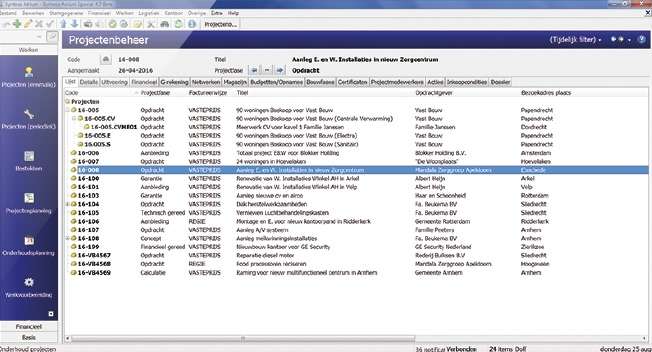
(Syntess. Project management)
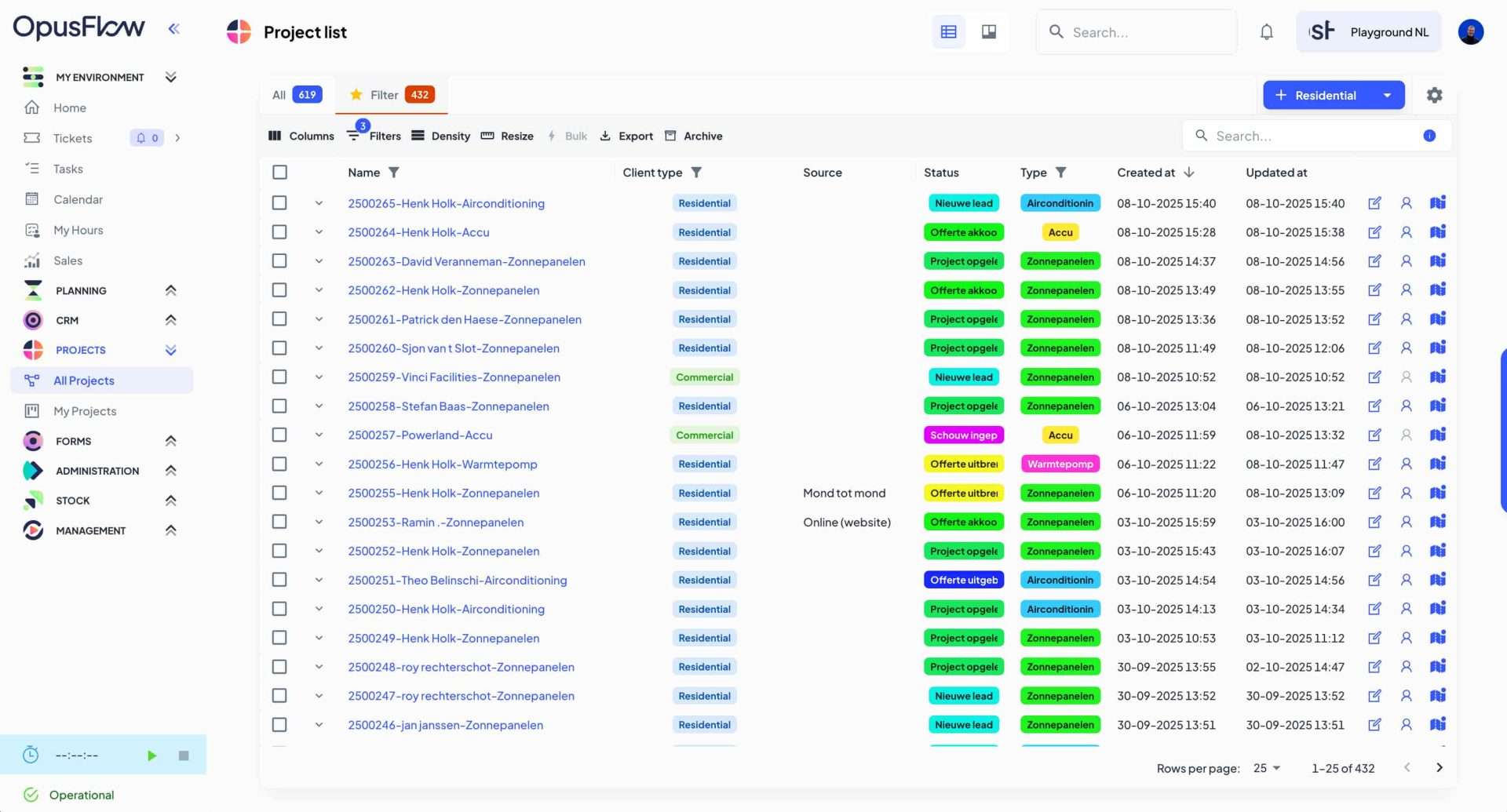
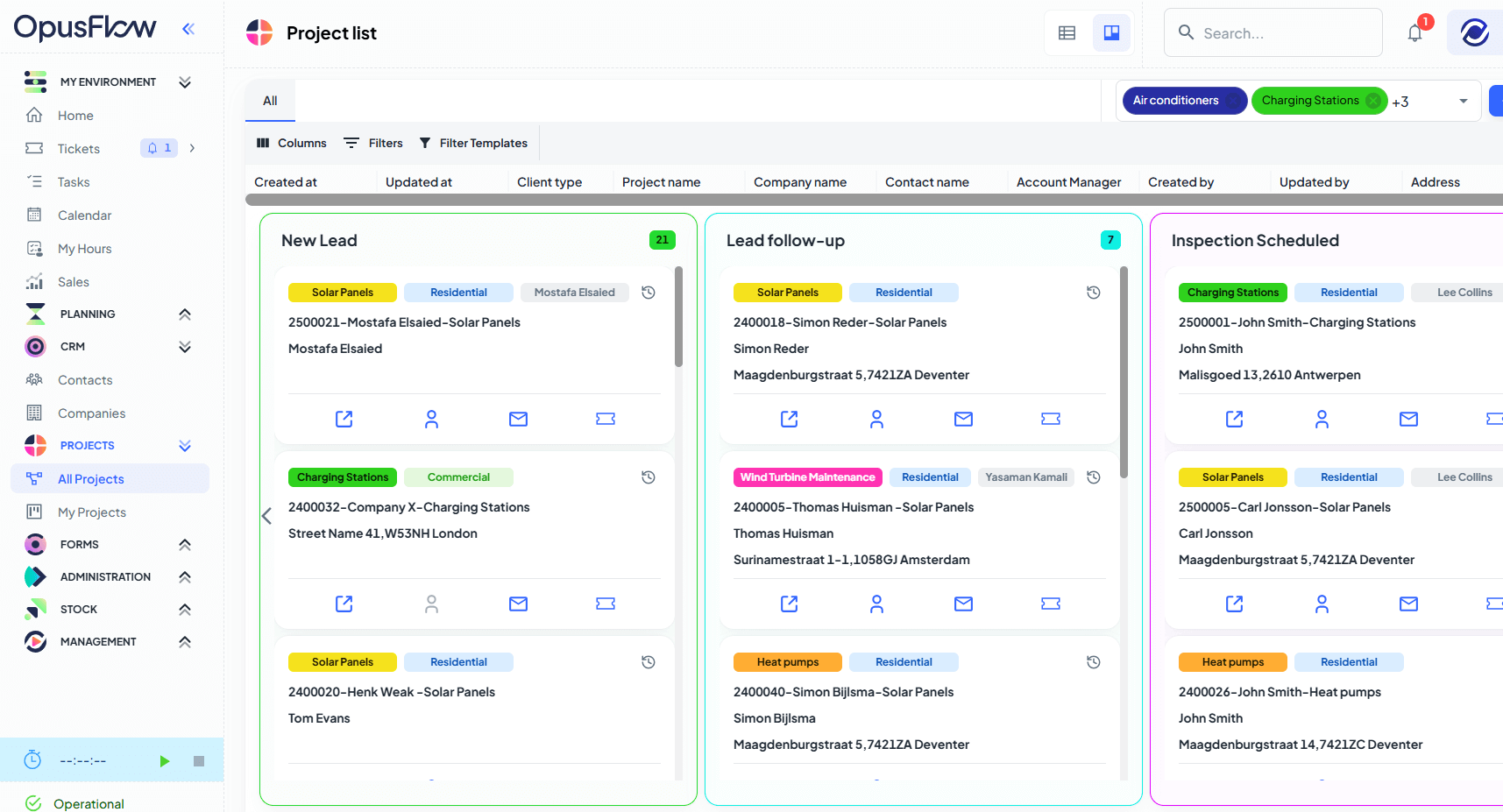
OpusFlow and its dedicated Project Management module run in the browser, so you can access it from anywhere. In the project list, status and installation type are colour-coded on every row, so you can see immediately which projects are new leads, which have an accepted quote, which are scheduled for inspection, and which are up and running. Filter by installation type, client type, account manager, or any other column in a couple of clicks.
And if you prefer a more visual way to manage your pipeline, you can switch to the Kanban board, where every project sits as a card in its current stage with the total deal value shown per column. It is the kind of overview that lets you and your team understand where the business stands without a single conversation or status meeting.
One thing that sets OpusFlow apart in day-to-day project management is the ability to automate status changes based on criteria you define. For example, a project can automatically move from “Inspection Scheduled” to “Quote in Progress” once a form is submitted, or shift to “Project Scheduled” the moment a quote is accepted. That means your pipeline always reflects reality, without anyone having to manually update a status at the end of a busy day.
Planning
If you have ever spent a Monday morning trying to figure out who is doing what this week, you know how much the right planning tool matters. Both Syntess and OpusFlow give you a visual grid to plan your team’s work across time.
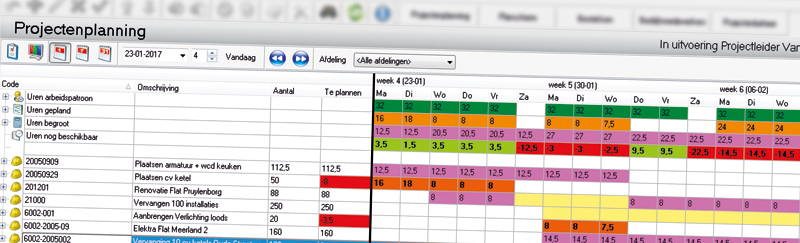
The Syntess planner shows project codes and hour allocations in a colour-coded weekly calendar, with a department filter at the top. It covers the basics of knowing what is planned and where hours are going.
(Syntess. Planning)
OpusFlow takes a slightly different approach to the same problem. Before you even look at the calendar, you see your active projects laid out as cards across the top of the screen, each one showing the client, the responsible team member, company size, and installation type. The planning below it is not just a grid of hours. It is your actual team, listed by name, with an efficiency indicator next to each person showing how loaded they currently are. You can see in seconds who has capacity and who is already full, without doing any mental arithmetic.
Most importantly, OpusFlow’s planning is smart because it goes beyond simple scheduling and actually matches people to projects based on what they’re good at, looking at each employee’s real competences and skills, not just who’s available. So, the right person ends up on the right project instead of whoever happens to have an open slot.

And when you need a different perspective on the week, or the month, or the year, you can switch between multiple view formats in one click. The planning adapts to how you think, not the other way around.
For a business running multiple installation crews across different job types, that combination of project context, team visibility, and flexible views makes planning feel less like administration and more like actually running the operation.
Purchase orders
Both tools give you a way to manage and track what you have ordered from suppliers.
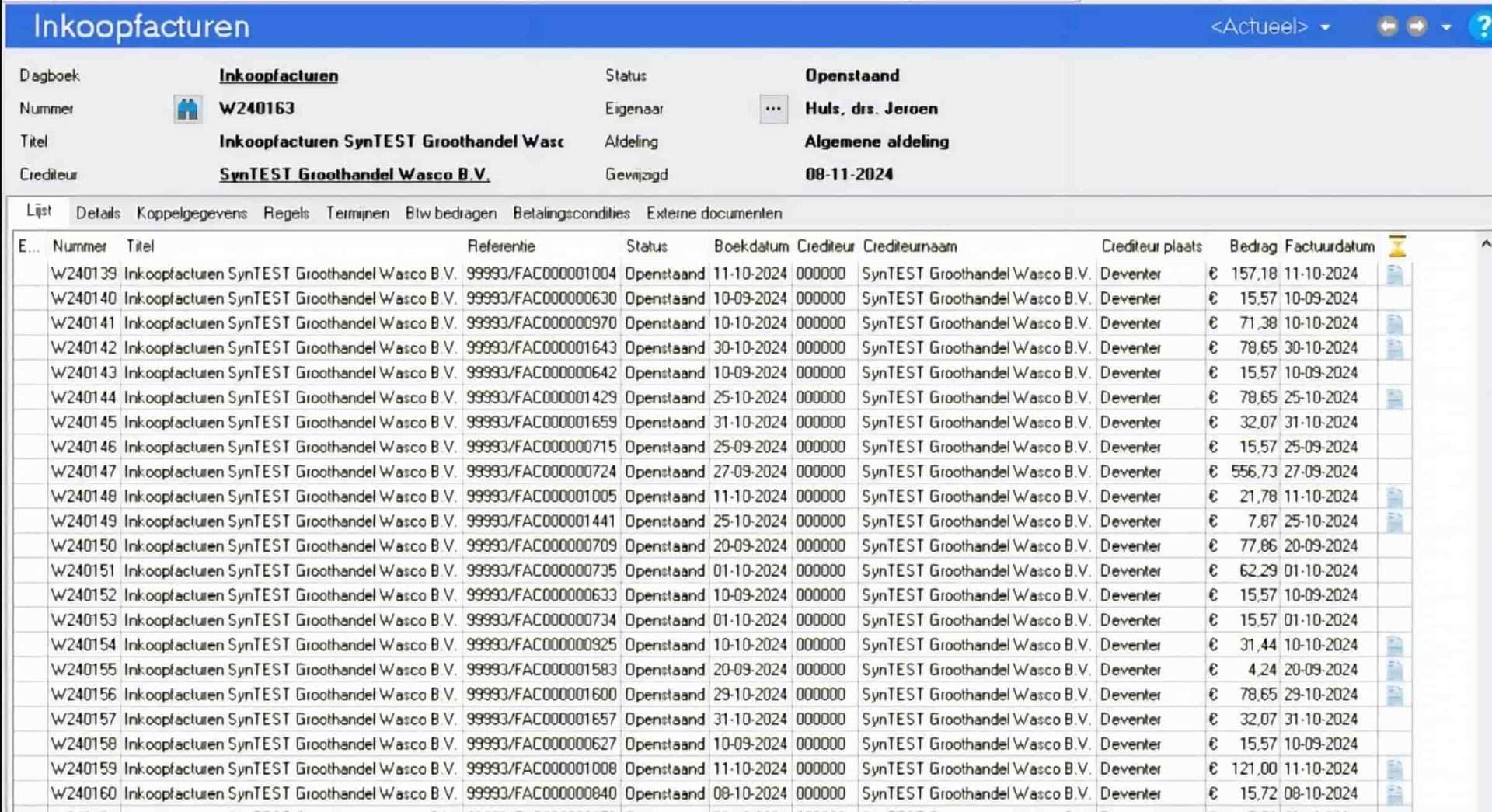
In Syntess, purchase invoices are handled through a form view where you see the order details at the top and the related invoice lines listed below. It covers the essentials for recording and tracking what has come in.
(Syntess. Purchase order invoices. The picture was taken here)
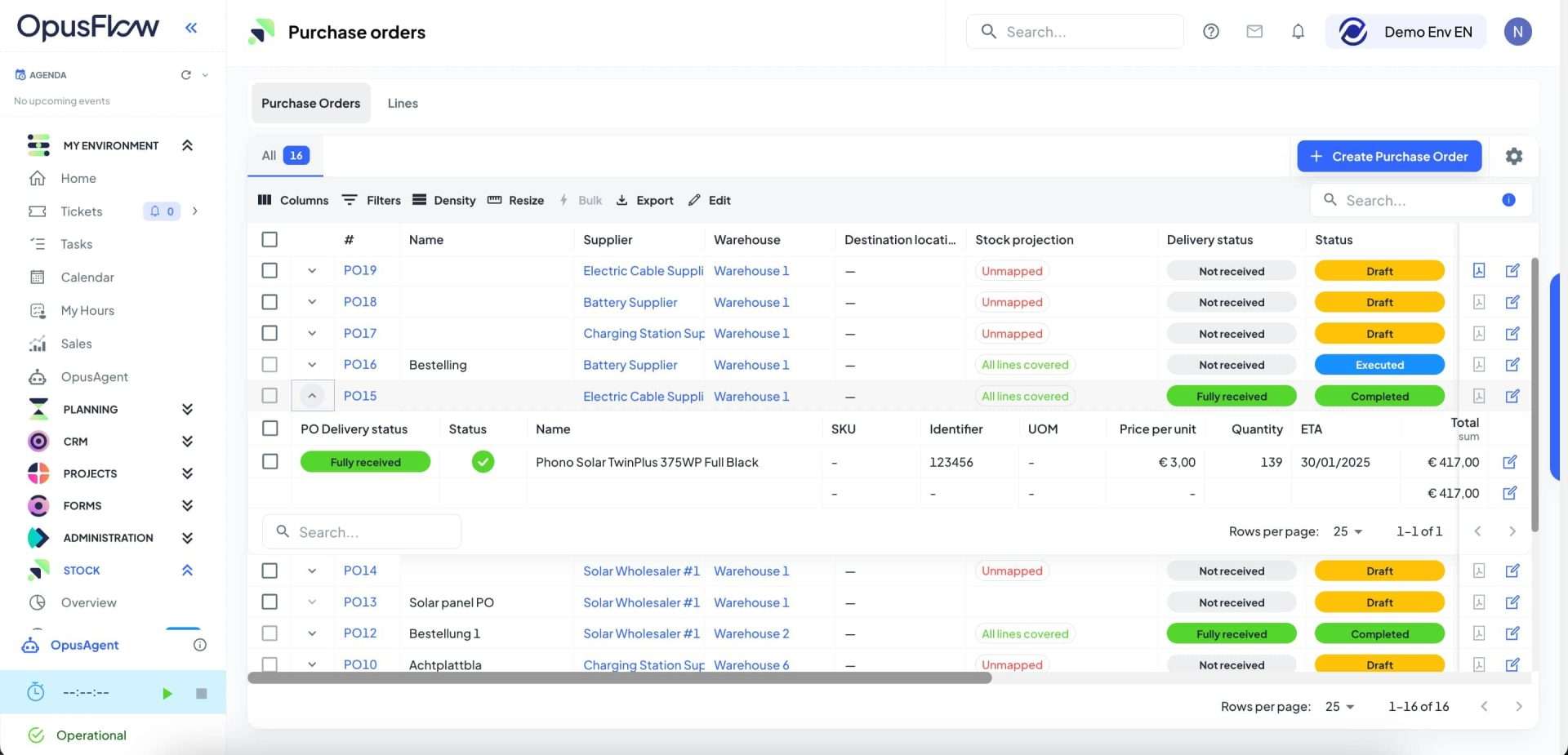
In OpusFlow, purchase orders live in a separate Purchasing & Stock module in a modern, clean, filterable list where every line tells you the full story at a glance: which supplier, which warehouse, what was ordered, at what price, and in what quantity. The delivery status is colour-coded on every row, green for fully received and grey for not yet received, so you can scan down the list and immediately spot what is still outstanding without opening a single record.
You can filter by supplier, warehouse, status, or any other column, and switch between viewing orders as a whole or drilling into individual order lines. If you want to see the overview of all units that were listed in an order, you don’t have to open another page, you simply click on the arrow and it shows you details. For anyone coordinating materials across multiple active jobs, that visibility makes a real practical difference on a busy week.
Read also: OpusFlow vs Syntess Software features comparison.
OpusFlow is more than a new interface
OpusFlow connects to your existing tools through an Open API, so your accounting package, your supplier catalogue, Google and Microsoft, your energy monitoring tools, or whatever else sits in your stack can talk to OpusFlow directly.
For example, OpusFlow interface directly with WhatsApp, so your team and clients can be notified automatically at the right moment in the process, without switching between apps. For an industry where a lot of communication still happens over the phone or in messaging apps, that connection makes a real difference in keeping everyone on the same page..
There is also OpusAI, a built-in AI data assistant that lives inside your OpusFlow environment. You can ask it to pull a margin report across or summarise your week’s planning. It works from your actual data, in plain language, without you needing to build a report or export a spreadsheet
Read more how it works: Introducing the AI in ERP: OpusAI.
There is a dedicated PV designer, calculators for battery storage and heat pump installations, so your sales team can put accurate, professional proposals together without waiting for back-office support. The CRM is built around how installation projects actually move, from first lead to signed quote, with a Customer Portal that lets your clients follow the progress of their own project directly.
If you want to see how it works and what opportunities OpusFlow provides specifically to your installation business, book a free demo and stop doubting whether you should switch.